

Best AI Tools for YouTube Creators in 2026
Creating a successful YouTube channel requires much more than recording and uploading videos. Creators have to research topics, write scripts, edit videos, design thumbnails, optimize titles, analyze performance, and consistently publish new content. In 2026, artificial intelligence is making many of these tasks faster and easier.
The best AI tools for YouTube creators in 2026 can help with almost every stage of the content-creation process, from generating video ideas and writing scripts to editing videos, creating thumbnails, producing voiceovers, finding keywords, and turning long videos into Shorts.
YouTube itself is also expanding AI-powered creator features. In September 2026, YouTube announced new Studio tools designed to help creators with research, brainstorming, performance insights, and personalized feedback on video structure, pacing, and storytelling.
If you want to save time while maintaining quality, the key is not to use dozens of AI tools. Instead, choose a small set that solves your biggest production problems.
Why AI Tools Matter for YouTube Creators in 2026
YouTube competition continues to increase, making efficiency increasingly important for creators. AI can automate repetitive tasks while allowing creators to spend more time on storytelling, originality, and audience engagement.
Depending on your workflow, AI can help you:
- Generate YouTube video ideas
- Research trending topics
- Find keyword opportunities
- Create video outlines and scripts
- Improve video hooks
- Edit videos faster
- Remove filler words and pauses
- Generate captions and subtitles
- Create thumbnails and graphics
- Produce AI voiceovers
- Generate B-roll and visual assets
- Repurpose long videos into Shorts
- Optimize titles and descriptions
- Analyze channel performance
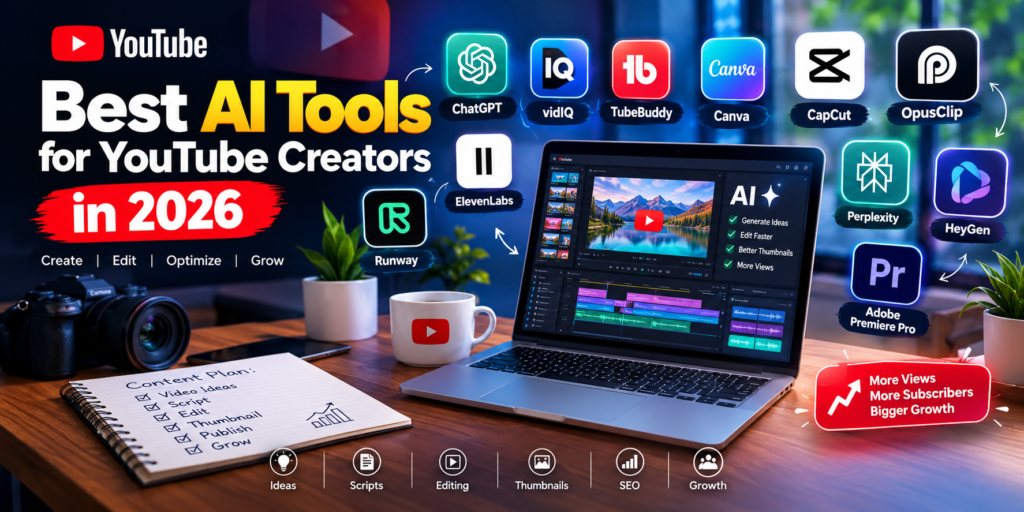
Recent 2026 creator-tool roundups consistently highlight tools such as ChatGPT, Descript, OpusClip, Canva, ElevenLabs, vidIQ, TubeBuddy, CapCut, and Runway for different parts of the YouTube workflow.
1. ChatGPT — Best for YouTube Ideas and Scripts
ChatGPT is one of the most versatile AI tools available to YouTube creators. It can help you move from a basic idea to a structured video plan in minutes.
You can use it to brainstorm:
- YouTube video ideas
- Video titles
- Hooks
- Script outlines
- Full scripts
- FAQs
- Video descriptions
- Calls to action
- Community posts
- Content calendars
For example, instead of asking AI to simply “write a YouTube script,” give it your target audience, video topic, desired length, tone, and key points you want covered.
The result will generally be much more useful when you provide specific instructions.
Best for: Beginners, educators, marketers, faceless channels, and creators who need help with content planning.
Pro tip: Don’t publish AI-generated scripts without editing them. Add your own experiences, opinions, examples, humor, and storytelling to make the content unique.
2. vidIQ — Best for YouTube Keyword Research
YouTube SEO is essential if you want your videos to appear in search results and attract viewers beyond your existing subscribers.
vidIQ focuses specifically on YouTube growth and can help creators with keyword research, video ideas, optimization, and channel analysis. Recent 2026 comparisons continue to rank it highly for YouTube-specific research and optimization.
You can use a tool like vidIQ to investigate:
- Search keywords
- Related topics
- Content ideas
- Competitor videos
- Potentially underserved topics
- Video optimization opportunities
However, don’t blindly target keywords with the highest search volume. Smaller channels can often benefit more from specific long-tail topics where the competition is manageable.
Best for: YouTube SEO, keyword research, topic discovery, and channel growth.
3. TubeBuddy — Best for YouTube Optimization
TubeBuddy is another popular YouTube-focused tool designed to help creators manage and optimize their channels.
It can be useful for:
- Keyword research
- Video optimization
- Title testing
- Thumbnail testing
- Channel management
- SEO workflows
Some 2026 comparisons particularly highlight TubeBuddy for YouTube SEO and testing features.
For creators who already have an established publishing workflow, tools like TubeBuddy can make optimization easier without requiring extensive manual research.
Best for: YouTube SEO, optimization, testing, and channel management.
4. Descript — Best for AI Video Editing
Descript takes a different approach to video editing. Instead of relying entirely on a traditional timeline, you can work with the video’s transcript and edit the content similarly to editing a document.
This is especially useful for:
- Talking-head videos
- Interviews
- Podcasts
- Tutorials
- Educational videos
- Screen recordings
Descript can help remove unwanted words, pauses, and sections while making transcript-based editing much faster. Recent 2026 comparisons continue to identify Descript as one of the leading AI-assisted editing options for creators.
Best for: Talking-head videos, podcasts, interviews, and educational content.
5. CapCut — Best for Fast YouTube Shorts Editing
CapCut has become a popular option for creators who need fast editing, especially for short-form content.
It can help with:
- Auto captions
- Background removal
- Templates
- Effects
- Transitions
- Social-media formatting
- AI-assisted editing
Current 2026 video-editing comparisons continue to highlight CapCut as a strong option for quick social and short-form video production.
For YouTube Shorts creators, speed matters. Being able to transform raw footage into a polished vertical video quickly can help you maintain a consistent publishing schedule.
Best for: YouTube Shorts, beginners, mobile creators, and fast editing.
6. OpusClip — Best for Turning Long Videos Into Shorts
If you create long-form videos, podcasts, interviews, or livestreams, you don’t necessarily need to create every Short from scratch.
OpusClip is designed to identify potentially interesting moments in longer videos and transform them into short-form clips. Current 2026 comparisons consistently place it among the leading tools for Shorts repurposing.
A simple workflow is:
Long YouTube Video → AI Clip Selection → Captions → Vertical Formatting → Shorts
This can help you extract additional content from videos you’ve already produced.
Best for: YouTube Shorts, podcasts, interviews, livestreams, and content repurposing.
7. Canva AI — Best for YouTube Thumbnails
A great video can still struggle to attract clicks if its thumbnail doesn’t communicate the value of the video.
Canva combines graphic-design tools with AI-powered features, making it useful for creators who don’t have advanced design skills.
You can use it for:
- YouTube thumbnails
- Channel banners
- Social-media graphics
- Video presentations
- Promotional images
- Simple AI-generated visual assets
Several 2026 creator-tool comparisons continue to recommend Canva for thumbnails and creator graphics.
Best for: Thumbnails, channel branding, social graphics, and beginners.
What Makes a Good AI-Assisted Thumbnail?
Don’t overcrowd your thumbnail with text. A strong thumbnail usually has:
- One clear subject
- Strong visual contrast
- Minimal text
- An obvious emotion or curiosity element
- A visual connection to the video’s topic
AI can help generate or modify assets, but your final thumbnail should be designed for humans, not algorithms.
8. ElevenLabs — Best for AI Voiceovers
Voiceovers are particularly important for faceless YouTube channels, documentaries, tutorials, explainers, and international content.
ElevenLabs is widely used for AI-generated speech, narration, and dubbing. Recent 2026 creator-tool comparisons identify it as a leading choice for voice generation and multilingual dubbing.
Creators can use AI voice technology to produce:
- Narration
- Explainer videos
- Documentary-style content
- Educational videos
- Character voices
- Multilingual versions
However, don’t assume that a realistic AI voice automatically creates good content. Your script, pacing, pronunciation, storytelling, and editing still matter.
Best for: Faceless channels, documentaries, educational videos, and multilingual content.
9. Runway — Best for AI-Generated Visuals
Sometimes you need visual footage that you cannot easily record yourself.
AI video-generation platforms such as Runway can help creators experiment with generated video clips, visual effects, and custom B-roll. Recent 2026 creator-tool comparisons continue to include Runway among notable AI video-generation options.
It can be useful for creating visual sequences for:
- Storytelling
- B-roll
- Concept videos
- Product presentations
- Cinematic transitions
- Creative experiments
Best for: Creative visuals, B-roll, cinematic content, and experimental videos.
10. Perplexity — Best for Topic Research
Before creating a video, you need reliable information.
AI research tools can help you discover:
- Recent developments
- Statistics
- Sources
- Industry trends
- Related questions
- Supporting information
Perplexity is one option creators use for research-heavy workflows, particularly when a topic requires current information. Some 2026 creator workflows recommend combining an AI research tool with a separate writing assistant rather than relying on one tool for everything.
Best for: Research-heavy YouTube videos, news, educational content, and fact gathering.
Always verify important claims against primary or authoritative sources before publishing.
11. HeyGen — Best for AI Avatar Videos
Not every creator wants to appear on camera.
AI avatar platforms such as HeyGen can help create presenter-style videos without traditional camera recording. This can be useful for:
- Business explainers
- Training videos
- Product presentations
- Educational content
- Multilingual videos
However, creators should be careful about overusing generic AI presenters. Audiences generally have more reason to subscribe when videos offer genuine expertise, personality, useful information, or unique storytelling.
Best for: Presenter-style videos, business content, explainers, and multilingual presentations.
12. Adobe Premiere Pro — Best for Advanced AI-Assisted Editing
For professional creators who need extensive control over their videos, Adobe Premiere Pro remains a powerful editing environment.
It is better suited to creators who want detailed control over:
- Multi-layer editing
- Audio
- Color
- Effects
- Transitions
- Professional workflows
- Complex timelines
AI features can speed up repetitive tasks, but Premiere Pro still provides the level of manual control professional editors often require.
Best for: Professional YouTubers, agencies, filmmakers, and advanced editors.
Best AI Tools for YouTube Creators: Quick Comparison
| AI Tool | Best For | Ideal User |
|---|---|---|
| ChatGPT | Ideas & scripts | Beginners & all creators |
| vidIQ | Keyword research | Growth-focused creators |
| TubeBuddy | YouTube optimization | Channel owners |
| Descript | Video editing | Talking-head creators |
| CapCut | Shorts editing | Short-form creators |
| OpusClip | Repurposing videos | Shorts creators |
| Canva AI | Thumbnails | Beginners & designers |
| ElevenLabs | Voiceovers | Faceless creators |
| Runway | AI visuals | Creative creators |
| Perplexity | Research | Educational creators |
| HeyGen | AI avatars | Presenter-style channels |
| Premiere Pro | Advanced editing | Professional creators |
How to Build an AI YouTube Workflow
You don’t need to subscribe to every AI tool available.
A better approach is to build a workflow around the specific stages of your content creation.
Step 1: Find a Video Topic
Use YouTube search, your audience’s questions, and tools such as vidIQ to identify potential topics.
Focus on topics with:
- Clear search intent
- Strong viewer interest
- Reasonable competition
- A useful angle
- A defined target audience
Step 2: Research the Topic
Use reliable sources and AI research assistants to collect information.
Don’t simply ask AI to invent facts. Verify statistics, dates, quotes, product claims, and other important information.
Step 3: Create the Script
Use ChatGPT or another writing assistant to create an outline.
A strong YouTube script should generally contain:
Hook → Problem → Promise → Main Content → Examples → Payoff → CTA
The first few seconds are especially important because viewers can leave before the video gets started.
Step 4: Record or Generate Your Video
Depending on your channel, you can:
- Record yourself
- Record a voiceover
- Use AI narration
- Create screen recordings
- Generate supporting visuals
- Combine several formats
Step 5: Edit the Video
Use CapCut for quick edits or Descript/Premiere Pro for more advanced workflows.
Remove unnecessary pauses and repetitive sections while keeping the natural personality of your presentation.
Step 6: Create a Clickable Thumbnail
Use Canva or another design tool to create a thumbnail that clearly communicates the video’s promise.
Remember that clickbait may get clicks, but misleading viewers can damage retention and trust.
Step 7: Optimize for YouTube SEO
Use keyword research tools to improve your:
- Title
- Description
- Topic targeting
- Relevant metadata
- Content structure
But don’t stuff keywords unnaturally. YouTube content should be created primarily for viewers.
Step 8: Repurpose the Video
After publishing a long-form video, use OpusClip or a similar tool to identify potential Shorts.
One long-form video can potentially become:
- 3–10 Shorts
- Community-post ideas
- Social-media clips
- Quote graphics
- Follow-up video ideas
The exact number depends on the original video’s length and content.
Best AI Tool Stack for Beginners
If you’re starting with a limited budget, don’t purchase everything at once.
A simple workflow could be:
ChatGPT → Canva → CapCut → YouTube Studio
This gives you tools for:
- Content planning
- Script development
- Thumbnail design
- Video editing
- Publishing and analytics
You can later add vidIQ or TubeBuddy for deeper SEO research and OpusClip when you start producing enough long-form content to justify repurposing.
Best AI Tool Stack for Faceless YouTube Channels
A faceless channel can use a workflow such as:
Research → ChatGPT → ElevenLabs → Runway/stock footage → CapCut → Canva → YouTube Studio
This approach can make production more efficient, but AI-generated content should still offer genuine value.
Simply combining an AI-written script, generic AI voice, stock footage, and automated editing isn’t a guarantee of success.
The differentiator is originality.
Can AI Help YouTube Channels Grow Faster?
Yes, but AI is not a shortcut to guaranteed views or subscribers.
AI can reduce the time required for repetitive tasks, allowing creators to publish more consistently. Current creator-tool research repeatedly emphasizes that the strongest workflow is usually a small collection of specialized tools rather than dozens of overlapping subscriptions.
The biggest benefits are often:
More efficiency + better consistency + faster experimentation
But growth still depends on:
- Topic selection
- Viewer demand
- Content quality
- Retention
- Packaging
- Thumbnail quality
- Titles
- Audience satisfaction
- Consistency
Should You Use AI-Generated Content on YouTube?
AI itself isn’t the problem. The bigger issue is whether your content provides genuine value and follows YouTube’s current policies.
Avoid creating large volumes of repetitive, low-value content simply because AI makes production easy.
Instead, use AI as an assistant.
Let AI handle repetitive tasks such as:
- Brainstorming
- Transcription
- Rough cuts
- Captions
- Research organization
- Repurposing
- Drafting
Keep human control over:
- Your opinions
- Your storytelling
- Your creative direction
- Your expertise
- Your final editing decisions
- Your relationship with viewers
This balance can help you produce content faster without making your channel feel generic.
Final Thoughts
The best AI tools for YouTube creators in 2026 aren’t necessarily the tools with the most features. They’re the tools that solve specific problems in your workflow.
For most creators, a practical starting stack is ChatGPT for ideas and scripts, vidIQ or TubeBuddy for YouTube research, Canva for thumbnails, CapCut or Descript for editing, and OpusClip for Shorts repurposing. For faceless channels, ElevenLabs can add AI voice capabilities, while Runway can help with custom visuals. These categories align with the major creator workflows highlighted by recent 2026 comparisons.
Most importantly, don’t let AI replace your creativity.
Use AI to save time—not to remove the human element from your channel.
A creator with a clear niche, strong storytelling, valuable content, and a smart AI workflow will generally have a much stronger foundation than someone simply publishing large amounts of automatically generated videos.